 HANBIT
2008-03-31
 23.4K
23.4K
( 생성자 )
Private sub class_initialize()
End sub
( 소멸자 )
Private sub class_terminate()
End sub
이들은 각각 하나의 응용 프로그램에서 재사용되는 개체로 정의되고 파괴되는 역할을 한다. 생성자는 Class에서 사용할 변수들의 초기 값을 지정하는데 사용된다. 소멸자는 생성한 Class를 소멸하는데 사용되며 기본적으로 다음과 같다.
Set mycls = nothingMycls는 Class명이며, Visual Basic 편집기의 Class 속성창의 이름과 같다. 기존에 사용하던 Visual Basic 코드를 재사용하고자 한다면 위의 방법을 이용하고 dll을 생성하여야 한다.
Private inhere as integer
(값의 대입) – inhere에 C#에서 제공하는 데이터를 입력함
Public property Let InVal(byval Ias integer)
Inhere = I
End property
(값의 인출) – inhere의 값의 C#에 제공 함
Public property Get OutVal()
OutVal=Inhere
End property
C#에서는 "OutVal"을 통하여 접근을 한다.
VB예제

Private x As Integer
Public Function Show() As Integer
   MsgBox ("Here is VB6 Function for public, You are calling me")
    Show = 0
End Function
Private Sub class_initialize()
    x = 10
End Sub
Public Property Let XPos(ByVal mX As Integer)
    x = mX
End Property
"
Public Property Get XPos() As Integer
    XPos = x
End Property
Private Sub Class_terminate()
    "
End Sub
C#예제

/*
 * Created by SharpDevelop.
 * User: Lim.Y.K
 * Date: 2008-03-26
 * Time: ?? 5:38
 *
 * To change this template use Tools | Options | Coding | Edit Standard Headers.
 */
using System;
using System.Collections.Generic;
using System.Drawing;
using System.Windows.Forms;
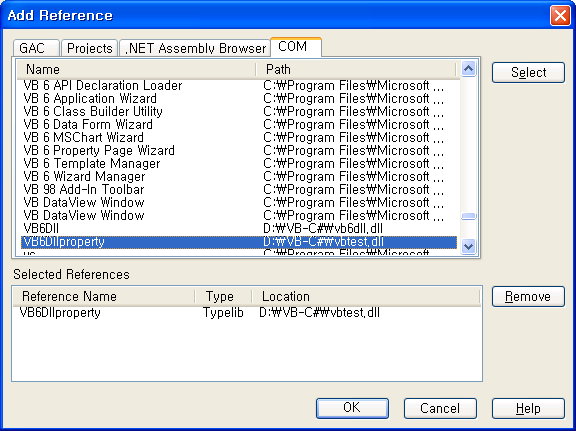
using VB6Dllproperty;
namespace dllvb6
{
 ///
 /// Description of MainForm.
 ///
 public partial class MainForm : Form
 {
  public MainForm()
  {
   //
   // The InitializeComponent() call is required for Windows Forms designer support.
   //
   InitializeComponent();

   //
   // TODO: Add constructor code after the InitializeComponent() call.
   //
   short y=20;
   // VB dll을 생성한다
   DllMain c = new DllMain();
   c.Show();
   // 10 출력
   y=short.Parse((c.GetType().GetProperty("XPos").GetValue(c, null).ToString()));
   // 처음 값
   MessageBox.Show(y.ToString());
   y +=10;
   c.GetType().GetProperty("XPos").SetValue(c, y, null);
    // 10 더하고, 20출력
   MessageBox.Show(y.ToString());
  }
 }
}
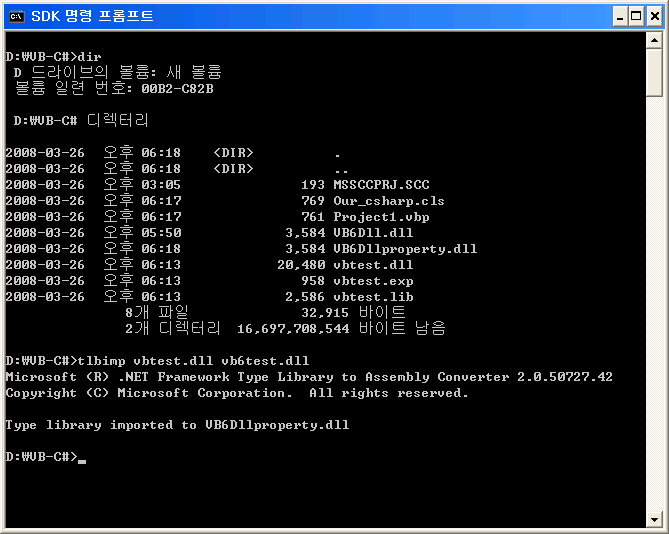
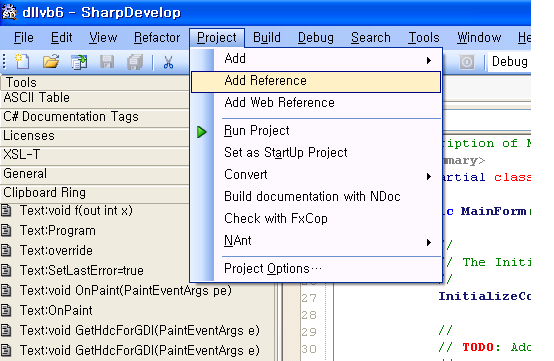
Convert Visual Basic dll to .Net dll
 0
0


 24
24 



댓글